
AI session notes are everywhere right now. Most ABA platforms already offer some version of the feature, and if you've been waiting for Motivity's, you've probably noticed we took our time.
That was on purpose. Session narratives are the kind of document that payors read months after the session happened, and the consequences of inaccurate documentation are getting more serious. Funders are tightening audit requirements and denials for documentation gaps have gone up. We didn't want to offer something fast and leave our customers figuring out the hard parts on their own.
So before building, we spent time on the problem itself.
The documentation problem we set out to solve
Session notes are high-volume, high-stakes writing produced at the end of a demanding session by the person who just delivered it. The narrative has to be clinically useful and defensible to a payer later. But many times, the person writing it is out of words.
We surveyed supervisors before building this feature, and their top complaints were vagueness, copy-and-paste documentation, and missing clinical detail. When we asked what was hardest about writing narratives, direct-service staff named “avoiding repetitive wording” more often than any clinical item on the list. Both groups were describing the same problem from opposite sides.
What we built starts from the principle that AI should draft the writing, and the clinician should always own the record.
The five decisions behind our AI session narrative generator
1. It works only from the note in front of it
The AI reads the fields on the current session note: data, checkboxes, targets, and the author's written observations. It turns that content into narrative prose using ABA terminology. It cannot access client profiles, historical session logs, or anything outside the current note.
This is a constraint we chose on purpose. A system that pulls from historical data might write a more polished paragraph, but it also introduces the risk of asserting something that didn't happen in this session. We'd rather the draft be incomplete and honest than comprehensive and wrong.
2. It does not make clinical decisions
The AI cannot make clinical recommendations or treatment decisions, and it cannot take actions in the system. It reads text and writes text. Clinical judgment stays with the clinician, by design and by restriction.
3. Your organization sets the voice
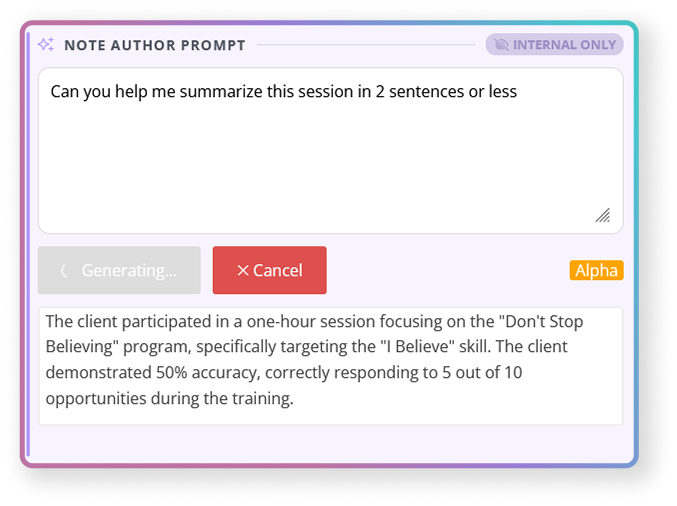
AI is enabled per text box within a session note template. Each enabled box carries two configuration layers: AI Prompt Instructions, which are your organization's guidance to the AI and run silently in the background, and a Note Author Prompt, the starting text or placeholder the author sees.
Strong prompt instructions name the session type being documented (97153, 97155, 97156, 97151), the narrative structure you want, the terminology and phrasing your organization prefers, and the data points you always want surfaced. If your team documents 97153s differently from 97155s, the AI knows that because you told it.
This is the mechanism through which your documentation standard becomes the AI's standard. The quality of the output depends directly on the quality of your configuration.
4. Accountability is built into signing
The generated text is fully editable. At signing, the author must check an attestation confirming they have personally read, verified, and approved the clinical accuracy of the AI-generated narrative. Exported and printed notes show only the final narrative. No prompt areas, no AI interface, nothing that shouldn't be in a medical record.
5. Your data stays out of AI training
Your data is not used to train the underlying models. That protects confidentiality, but it also means narratives do not automatically get "smarter" about your organization over time. Output quality comes from your prompt instructions and your authors' observations.
The AI won't get better on its own from using it. But your client data never leaves to train a model somewhere, and to us that's the more important thing to protect.
What we learned before shipping
Before releasing AI session notes to all customers, we ran a study with ABA provider organizations. Clinicians used the feature in real workflows over a sustained period, and we surveyed both direct-service staff and BCBA® supervisors before and after.
Here's what stood out.
Authors reported real relief. Eight of ten responding RBTs said narrative writing was faster than before and reported meaningfully lower mental effort. Generation speed was the single highest-rated item in the study. One respondent described worrying considerably less about whether enough had been captured. That matters in a workforce where documentation anxiety contributes to burnout.
Supervisors saw improvement where their baseline pain was. The documentation qualities supervisors rated highest after implementation were reduced vagueness and improved clinical language, which were the complaints they named most frequently before the feature existed. After implementation, supervisors rated improved clinical language and reduced vague or subjective documentation highest. Five of eight reported requesting revisions less often. None reported requesting more.
How Motivity’s AI session note narrative generator works
Here's the full flow, from setup to signed note:
- An admin enables AI on one or more text boxes within a session note template and writes instructions to guide the AI's output.
- The note author completes all fields as usual and adds their observations in the AI prompt area.
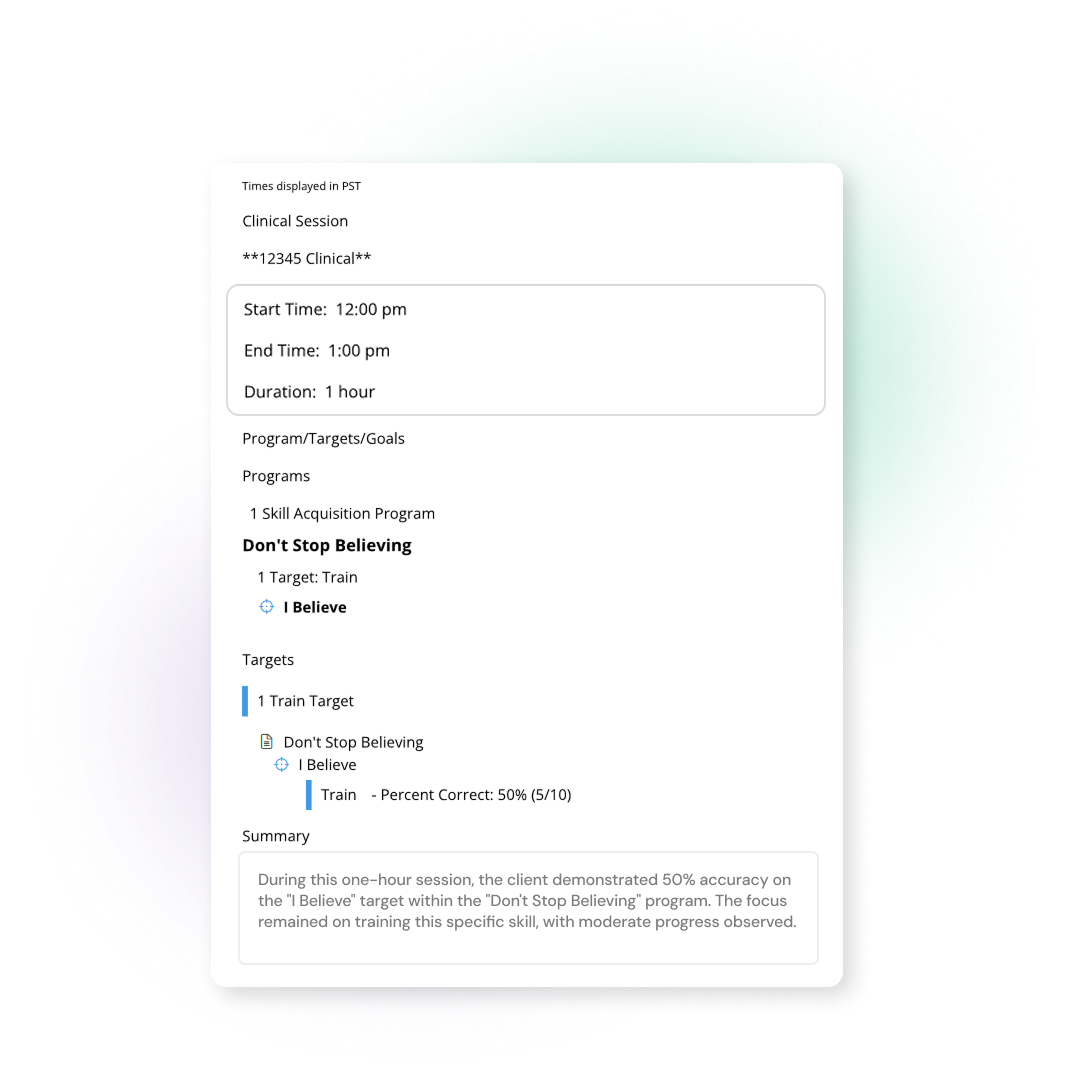
- The author clicks Generate. The AI reads the note fields and observations and produces a clinical narrative.
- The author reviews the narrative, makes any needed edits, and refines it until it accurately reflects the session.
- When signing, the author confirms they have reviewed and approved the AI-generated content.
Internal-only fields
Templates can also include internal-only sections: structured fields like dropdowns and checkboxes that guide the technician through documenting the session (how did the learner arrive? what interventions were used? what was the overall response?). These fields feed into the AI's generation but don't appear in the exported or printed note. This helps in getting a cleaner final document and a more guided experience for staff who are still learning how to document well.
Role-based permissions
Two permissions govern access. Manage Note/Report Templates lets an admin configure AI on a template. Use Session Note AI lets an author see and use the generator. Without the second, the text box appears as an ordinary manual field. Because enablement is per template and per text box, and access is per role, you can run a contained pilot without a platform-wide change.
Works with existing templates + prompt library
You don't have to build new templates from scratch. AI can be enabled on any existing session note template by checking a box and adding your prompt instructions. And if you're not sure where to start with prompts, our prompt bank has ready-to-use starting points organized by session type (97153, 97155, 97156, 97151) that you can copy, paste, and customize.
Watch it in action
During the alpha testing, we hosted a live walkthrough where our team demoed the full feature, answered questions, and shared implementation tips. You can watch the recording here:
Already using Motivity? AI session notes are live in your account
AI session notes are now available for all users of Motivity’s data collection software with no add-on cost. To get started, follow the instructions here to enable it safely and effectively in your org, or connect with your Customer Success Manager, and they'll walk you through enablement and help configure your templates.
I’m also hosting office hours on Wednesdays and Fridays to help with any questions!
Once you get started, these resources will help:
- Best practices for creating AI session note templates -> template design patterns for different service types and staff skill levels
- Suggested prompt bank -> ready-to-use prompts organized by CPT code (97153, 97155, 97156, 97151) that you can copy and customize
If you're evaluating Motivity and want to see how AI session notes would work in your practice, we're happy to walk you through it. Talk to our team.