
How much of what you prescribe actually gets delivered in session?
That’s a question most BCBAs have, and until now, answering it meant digging through raw data session by session. Motivity’s new Acuity features change that.
The problem these features solve
Trial count adherence is one of those things that's simple to prescribe and surprisingly hard to maintain and track. A BCBA® sets the expected number of trials per target, but the RBT® running the session has to balance that prescription against session length, learner engagement, competing programs, and managing maladaptive behavior. The further you get from the treatment plan, the easier it is for adherence to drift.
Training helps, but it doesn't close the gap entirely because the core issue isn't knowledge. It's that most of this information isn't visible during the session itself. That's what led the team to design this research study.
Could visual cues while collecting data improve trial count adherence? We tested it.
We wanted to find out whether the data collection system itself could give RBTs the kind of real-time cues that help them stay on track with what was prescribed, without adding more burden.
The study was funded by the National Institutes of Health (NIH SBIR Grant R44MH131510) and conducted with 21 behavior technicians across seven ABA organizations already using Motivity.
They added visual indicators to the session view for one group of BTs: prescribed trial count displays, color-coded completion tracking, and attention flags for targets that had been skipped in the previous session. A control group kept using Motivity as usual, with no changes.
After six weeks, 63% of the BTs who received the visual indicators improved their adherence to prescribed trial counts by 10% or more. The control group saw a 40% improvement rate over the same period. And when we asked the intervention group whether they found the indicators useful, 91% said they wanted to keep them.
For the methodology, single-subject results, study limitations, and a Trial Count Framework developed by Emaley McCulloch, Motivity's Chief Clinical Officer, for setting individualized prescribed trial counts across different learner profiles, download the research study whitepaper.
What Motivity's new Acuity features let you see (and decide) during a session
The visual indicators that improved adherence in the study are now live in Motivity for all users. And we built on them. The latest release adds a full set of session-level features designed to make prescribed expectations visible, track how closely each session follows the treatment plan, and give BTs and supervisors real information during and after the session.
BCBAs can walk into supervision with specifics
Individual target flags help BTs make moment-to-moment decisions. But there's a second layer of information that matters just as much: how the session is going as a whole.
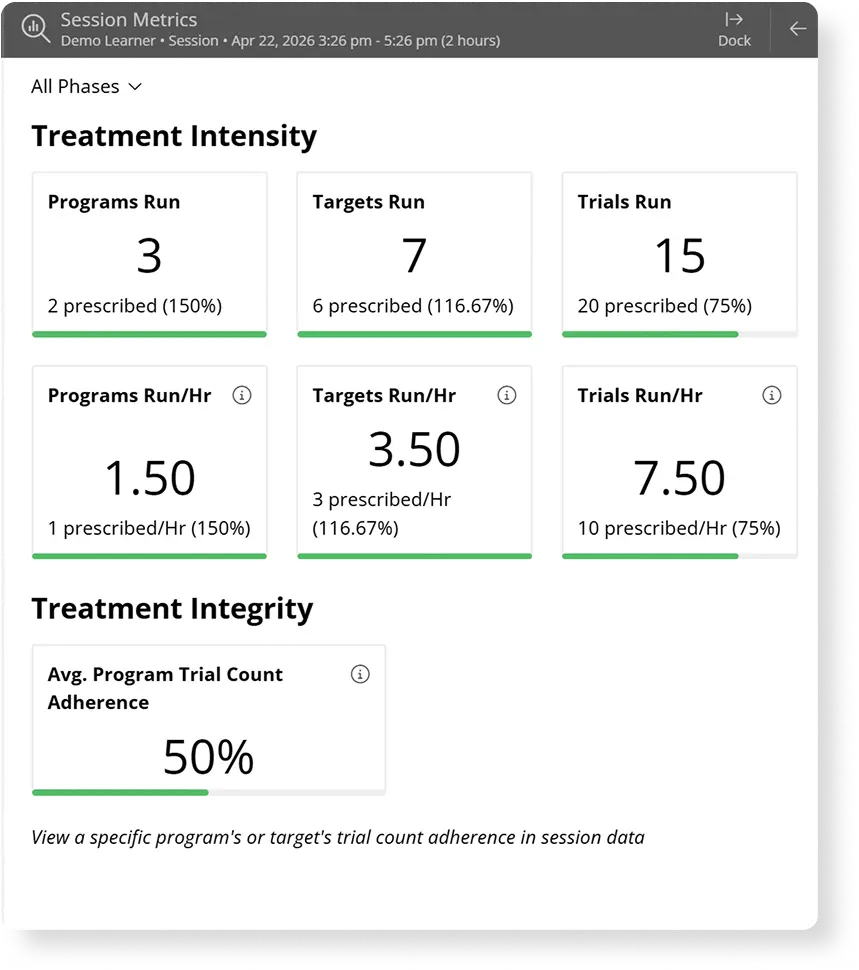
A new metrics panel, available during or after a session, shows the full picture. How many of the prescribed programs were actually run? What percentage of trial counts were met? How many trials per hour is this session producing? These numbers update as data are collected, so a BT who checks midway through a three-hour session can see whether they're on track or need to reprioritize.
For supervisors reviewing sessions after the fact, the same data allow them to spot patterns without pulling raw data line by line.
A staff member who consistently hits 100% of prescribed programs but falls short on trial counts tells you something different than one who runs fewer programs but meets every count. Both conversations matter, and now the data to start them is already surfaced.
RBTs can see which targets need attention at the start of each session
Picture a BT starting a session with a learner who hasn't been seen in a few days, while other staff have run sessions in between. Which goals got missed? Which ones need extra repetition today? How many trials did the BCBA prescribe for each target?
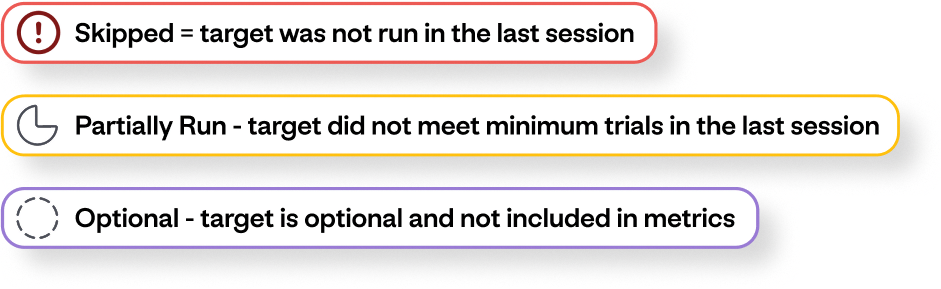
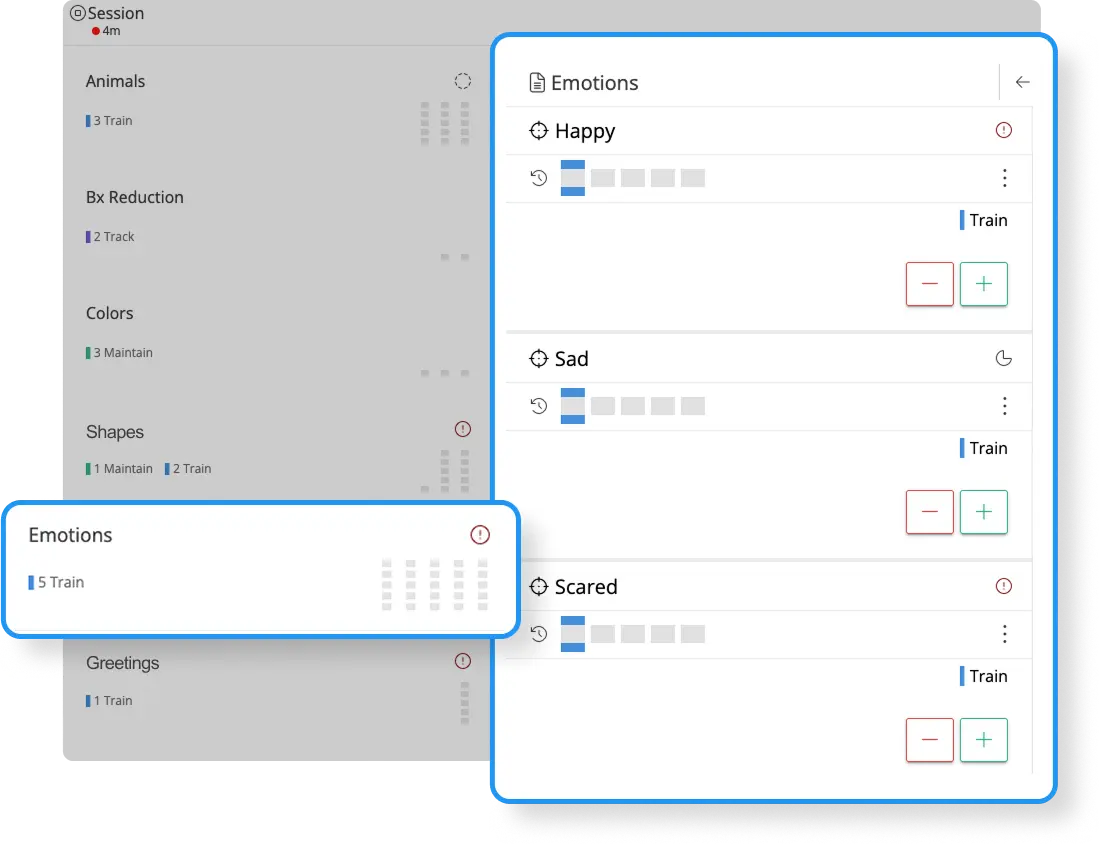
Before, answering those questions meant scrolling through previous session data or relying on memory. Now, the answers are right there in the data collection view. Each target displays how many trials are expected, how many have been completed, and whether the target was skipped or only partially run in the last session. Color-coded flags make it easy to spot where attention is needed first.
BTs can also filter their view to surface only the targets that need focus, and an in-app icon guide helps new staff quickly learn what each indicator means.
Session metrics are now part of every learner's record
Metrics are available in real time during the session as a dockable panel the BT can keep visible while collecting data, and in every learner's timeline after the session ends.
What used to require reviewing note after note now lives aggregated in each session record, visible at a glance.
Watch it in action
I was recently joined by Emaley McCulloch, Motivity's Chief Clinical Officer, as we walked through these features in a recent webinar, including how the metrics look inside Motivity and what clinical decisions they can inform. Watch the replay:
Already using Motivity? The new Acuity features are live in your account
The features are available now for all new live sessions. To get the most out of them, make sure your programs are configured with the right settings for prescribed trial counts and expected targets. Check out our guides:
How to use the Acuity features
Acuity FAQ and troubleshooting
If you're evaluating Motivity and want to see how these features would work in your practice, we're happy to walk you through it. Talk to our team.