
Clinical Highlights this Month
PM Highlights this Month
- Transfer Billed Appointments to a New Payer (Bulk)
- Edit Drive Time and Mileage for Recurring Appointment Series
- Payroll Report Showing Time in Minutes
- School Enrollment Workflow
- Other Enhancements & Fixes
Program Search
Where to find it: Program template libraries > “Find”
At a glance: Search for programs within all program template libraries
What’s new:
- Search across multiple libraries
- Search within a single library
Browse libraries more efficiently to find specific programs for your learner. This makes it easier to leverage Motivity’s treasure trove of curated programs so you don’t have to build your learner’s programs from scratch.
Program Draft Visibility
Where to find it: My Drafts, Learner > Programs & Progress List, or in the Program Editor
At a glance: Team-wide visibility of others’ program drafts and indications for outdated drafts
What’s new: Previously, team members could only see their own program drafts. Now they have greater visibility into ongoing work across the team.
- View all program drafts created by any team member, including date created and last edited timestamps.
- A yellow warning icon now appears on the outdated drafts to indicate a newer version of the program has been saved since that draft was created.
- Within the Program Editor, you will now see notification banners if:
- Another team member has a draft for that same program
- The draft you are currently editing is outdated
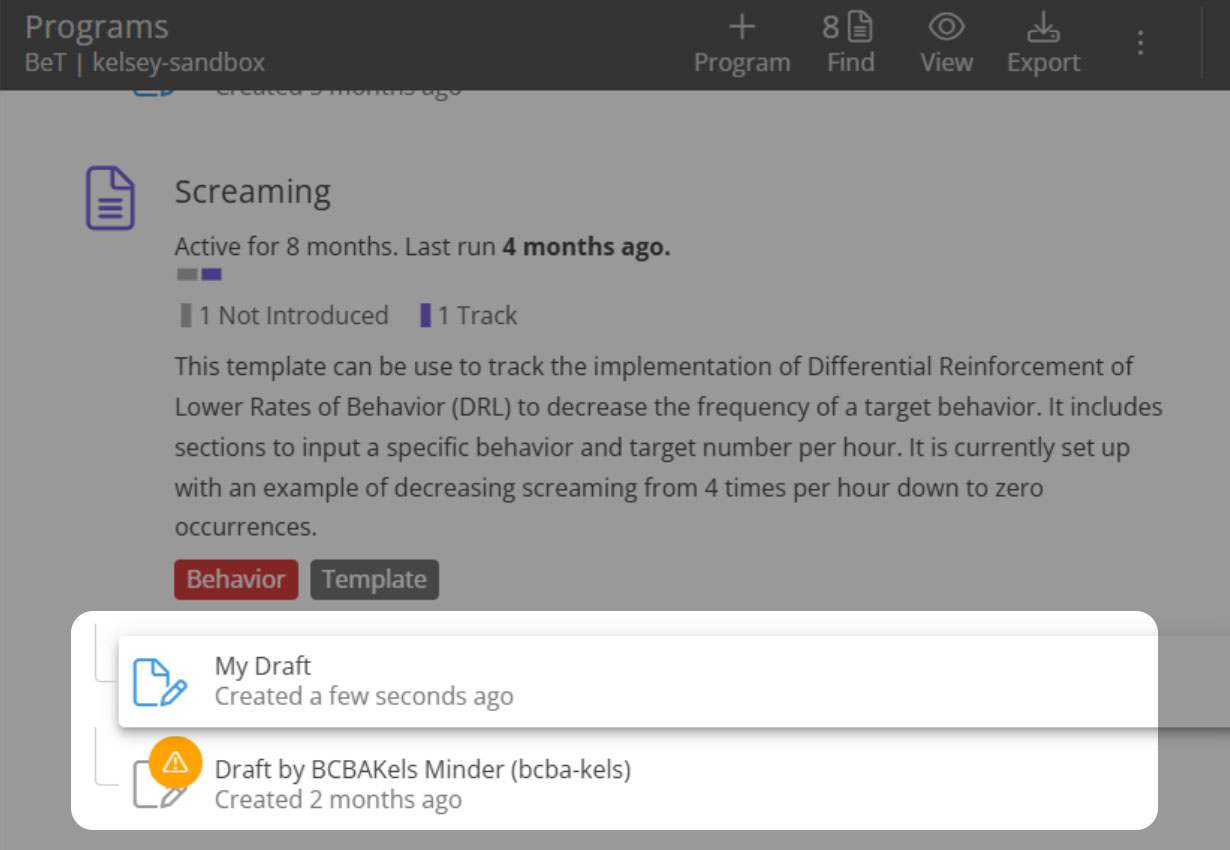
This improves transparency and reduces risk of overwriting programs which may lead to unintentionally deleting targets.
View and Update PM Appointment Details from Motivity Clinical
Where to find it: Any appointments card > Select appointment or Linked note > “Appt Details”
At a glance: Select appointment details are available on Clinical for viewing and editing.
What’s new: Appointment details are reflected on both PM and Clinical modules and updated immediately. Changes in Clinical include:
- View scheduling notes and estimated drive time/mileage
- View and edit reported drive time/mileage and appointment issue notes
- A new permission allowing users to edit other’s appointments.
Users can make edits to their own and/or others appointments from the appointment card or from a note when linked to the appointment.
Direct service providers can easily view and add information about an appointment in one place. This enables providers to communicate actual drive time, mileage, and any reasons for discrepancies back to operations, directly from the clinical system.
Transfer Billed Appointments to a New Payer (Bulk)
If a client switches insurance after claims are already billed, you no longer have to correct them one by one. You can now transfer already billed appointments from one payer to another in bulk.
What’s improved
- Only billed appointments appear (no extra filtering)
- Choose from the client’s existing authorizations under the new payer
- Resubmit to the clearinghouse without manual claim-by-claim fixes
Why it matters
Insurance changes happen. This reduces rework, speeds up corrections, and keeps billing clean.
Where to find it
Admin Module → Appointments Transfer →Transfer Type
Access required
Enabled by default with existing Access Level (Admin > Access Level > Admin Menu > Appointment Transfer > View)
Edit Drive Time and Mileage for Recurring Appointment Series
Managing recurring appointment series just got easier. When updating drive time or mileage, a pop up will guide and allow you to:
- Update just that appointment, or
- Update all future appointments in the series
Why it matters
No more editing each appointment individually. Save time while keeping flexibility for one-off changes.
Where to find it: Scheduler View (Patient/Provider) → Drivetime detail pop-up in the recursive series
Access required: Enabled by default with existing Access Level. Admin > Access Level > Scheduler >Scheduler VIew > Edit Estimated Drive time & Mileage
Payroll Report Showing Time in Minutes
If your payroll system requires appointment duration in minutes, Motivity can now match that format. You can run a payroll report that displays the time in minutes instead of hours.
Also included
- Updated column order and naming to better align with common payroll/HRIS systems
- A new appointment completion (rendered) field
Why it matters
No manual time conversions. Fewer payroll errors. One source of truth.
Where to find it: Reports → Payroll Reports
Access required: Enabled by default with existing Access Level
- Admin > Access Level > Reports> Payroll > Payroll Report
School Enrollment Workflow
Schools often require different documentation than insurance payers. Now you can track those requirements separately.
What’s Improved:
This new workflow supports school-based provider compliance, while keeping the experience consistent with other Motivity workflows.
This includes:
- Provider alerts (toggle-based)
- Provider status tracking report for active school workflows
- Assignable workflow steps to specific team members
- Email notifications to step owners
Why this matters:
Schools often require different documentation than insurance payers. This workflow helps teams track school compliance clearly, while keeping the experience consistent with other Motivity workflows through familiar alerts and reporting.
Where to find it:
Provider Module → Enrollments → Add More → School
Access required: New Access Level - Disabled by default
- Admin > Access Level > Providers> Enrollments > School Enrollment Workflow
Other Enhancements & Fixes (Summary)
- Recurring appointment visibility: Users can now see at the top of appointment details when an appointment is part of a recurring series, including series details for immediate and clearer visibility.
- Filters added to the Patient Notes Report: New filters for patient status, patient office, and note type to make it easier to find specific notes.
- Filters added to the Contract Rate Report: New filter for rate status (active vs. expired) to improve efficiency when reviewing rates.
- Appointment conflict alerts improved: A new column now shows staff designation/role to help teams resolve conflicts faster by seeing who is impacted.
- Audit Report enhancement: Appointment issue notes can now be included in the Audit Report to improve visibility into appointment changes and support more complete workflows in one place.