
What’s New This Month
This release introduces major updates across Reporting, Scheduling, Revenue Cycle Management, and AI-powered workflows.
The focus of this release is simple:
- Make scheduling easier and more flexible
- Give organizations clearer operational visibility
- Reduce billing and compliance errors
- Improve reporting accuracy and access control
- Give teams more control over AI scheduling tools
AI Module
Smarter scheduling. More configurable AI. Better operational guidance.
Feature Overview
This month’s AI updates give organizations more control over scheduling optimization while surfacing clearer patient-level scheduling insights.
1. Configurable AI Scheduling Optimizer - KBA
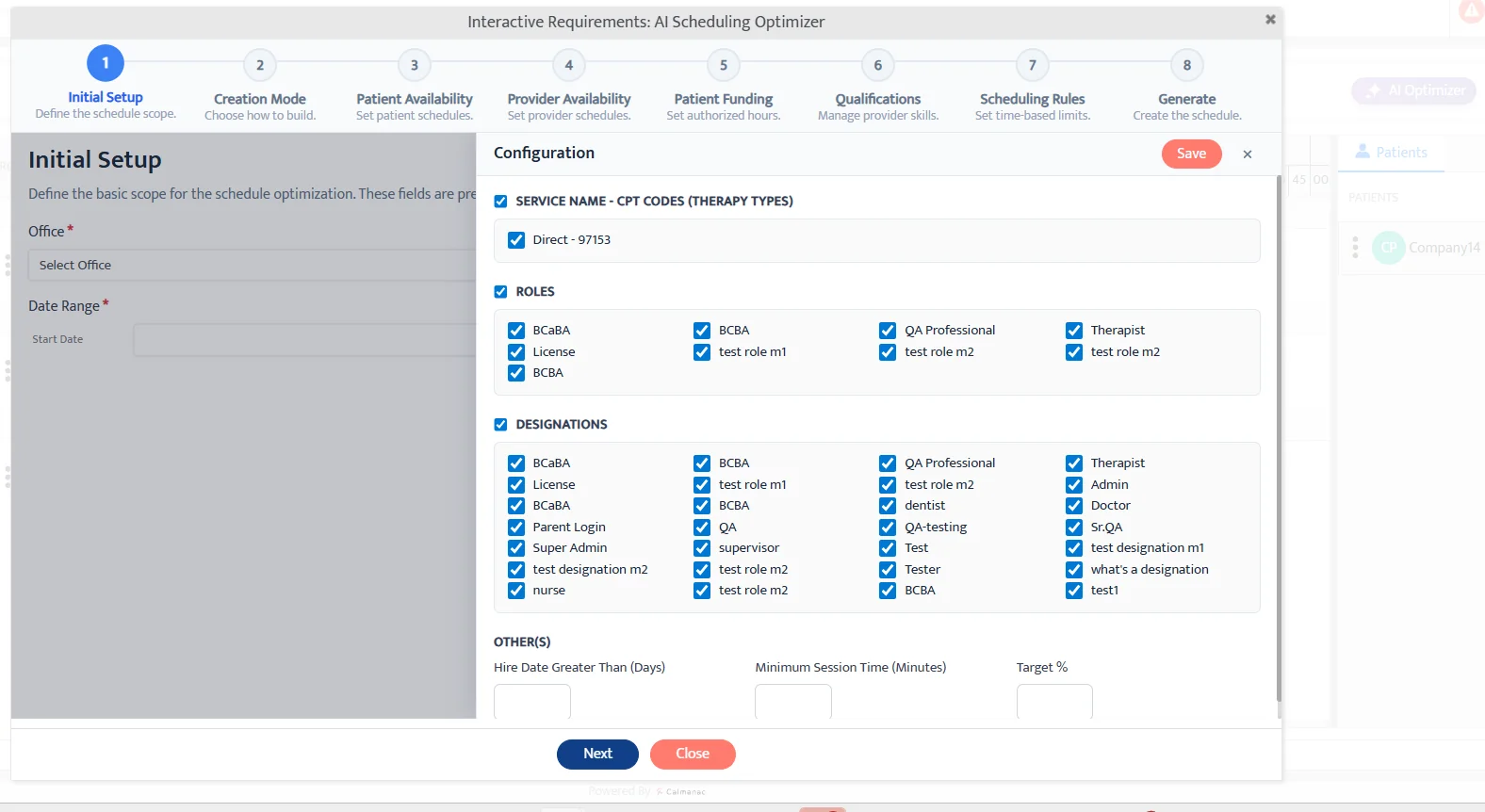
Navigation: Scheduler → All Providers View → AI Scheduling Optimizer
What Changed
Organizations can now define:
- Eligible services
- Eligible roles
- Designations
- Session minimums
- Scheduling targets
Why This Matters
This gives organizations more control over how AI scheduling works.
Teams can now:
- Decide which services and providers AI should use
- Set scheduling rules that match their workflow
- Improve the quality of AI-generated schedules
- Reduce the need for manual adjustments
Important:
This is currently a Beta feature enabled on request.
2. AI Coach for Scheduler – Patient-Level Insights - KBA
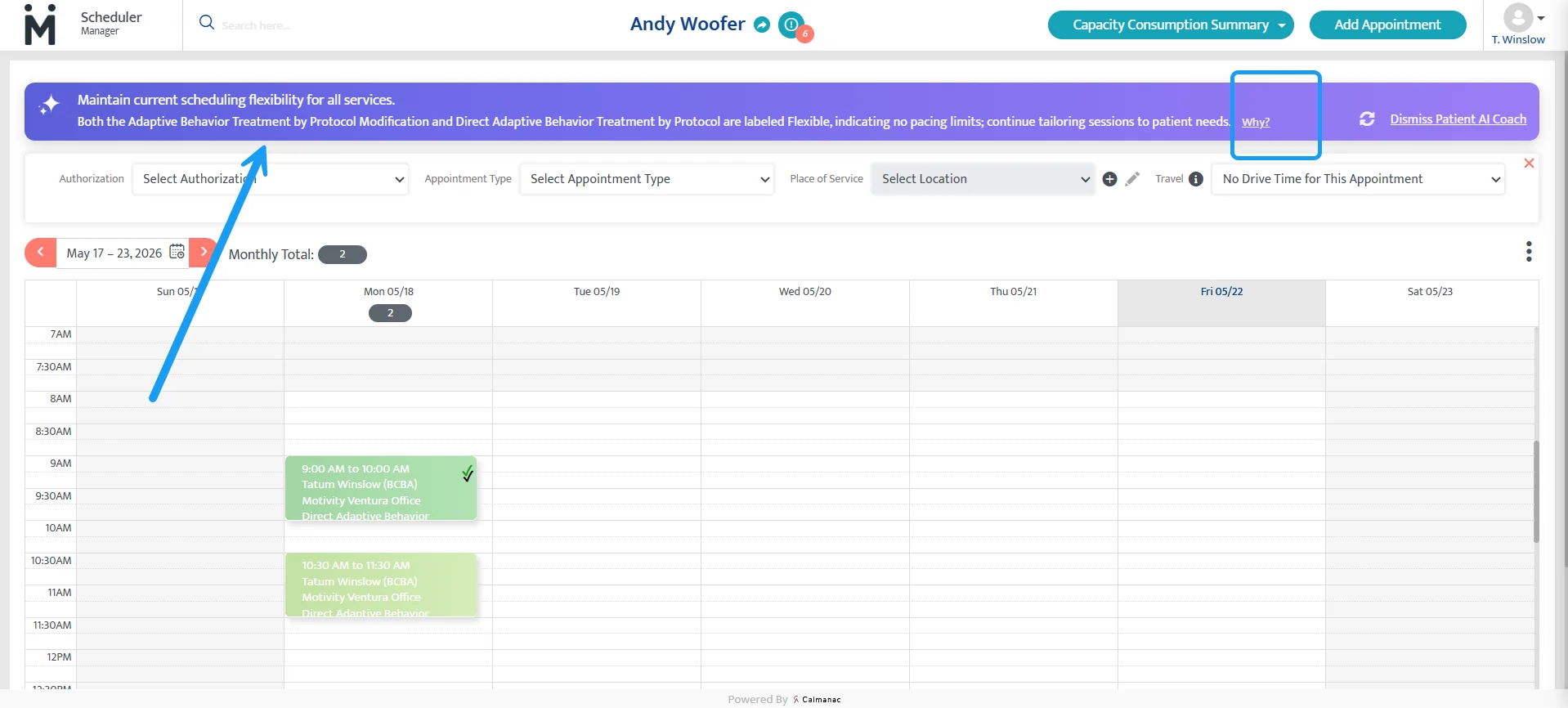
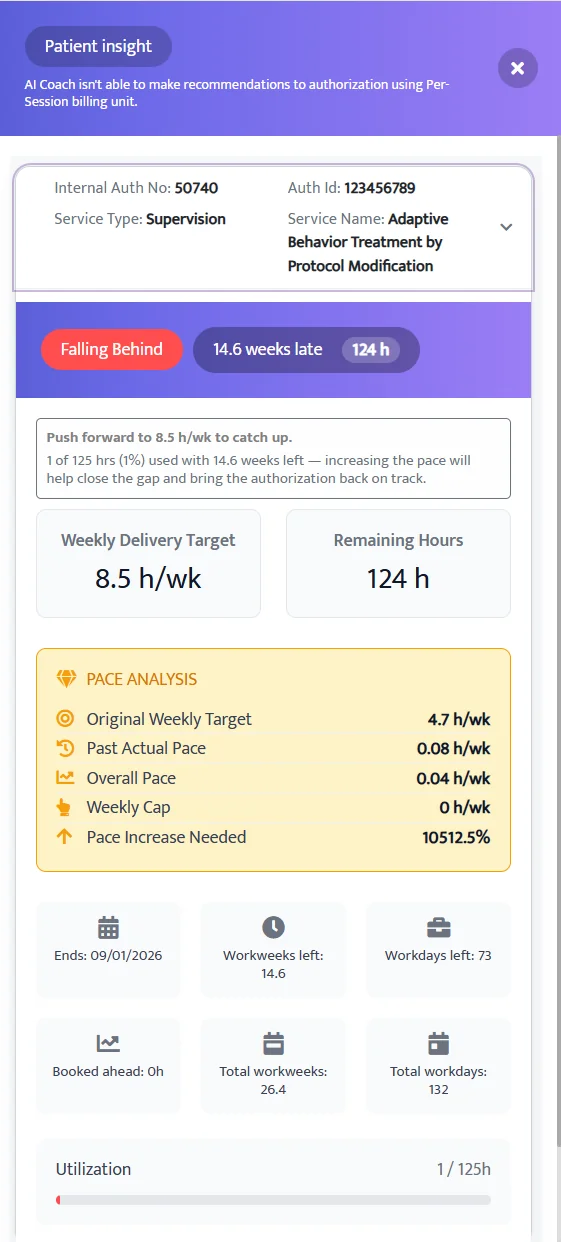
Navigation: Scheduler → Patient View
What Changed
The AI Coach now analyzes the patient across all authorizations as soon as the patient is selected.
Previously, insights appeared only after selecting individual authorizations.
What’s New
- Overall authorization utilization insights
- Guidance on scheduling pace
- Recommendations for next scheduling actions
- “Why” panel with authorization-level detail
Why This Matters
This helps schedulers quickly understand if a patient is on track or falling behind on authorized hours.
It also helps teams:
- Catch scheduling gaps earlier
- Prioritize patients who need more appointments
- Make faster scheduling decisions
- Reduce missed authorization hours
3. Drag and Resize AI-Projected Appointments - KBA (same KBA as number 1)
Navigation: Scheduler → AI Scheduling Optimizer → Projected Schedule
What Changed
AI-generated projected appointments can now be adjusted before acceptance.
Previously, projected appointments were view-only.
What’s New
- Drag appointments within provider lanes
- Resize appointments to adjust duration
- Save modified AI projections directly
Why This Matters
Schedulers can now make quick changes to AI-generated appointments before saving them.
This reduces extra editing steps and gives users more flexibility when building schedules.
Scheduler / Practice Management Module
More flexibility. Fewer manual steps. Better scheduling control.
Feature Overview
This release expands recurring scheduling, improves group appointment workflows, and introduces more intelligent availability management.
1. Recurring Appointments for Group Sessions - KBA
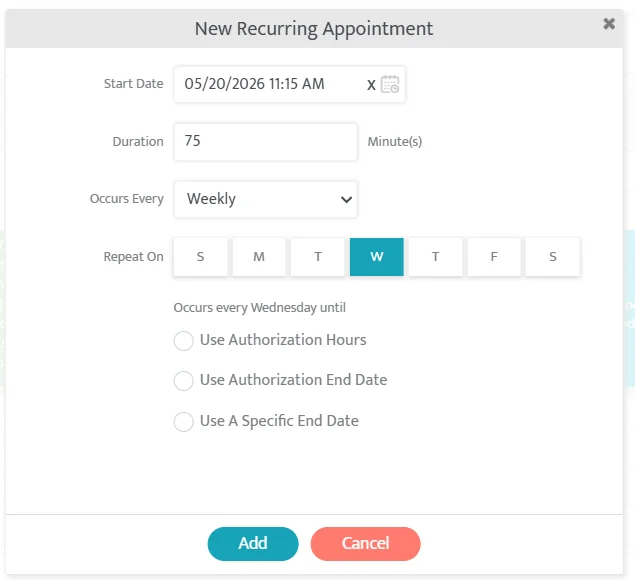
Navigation: Scheduler → Create Group Appointment → Recurring
What Changed
Users can now create recurring group appointments using the same workflow as standard appointments.
What’s New
- Daily, weekly, and custom recurrence patterns
- Recurring end conditions:
- Authorization hours
- Authorization end date
- Specific end date
- Series editing and deletion support
- Supports all Scheduler views
- Supports drag-and-drop scheduling
Why This Matters
This makes recurring group scheduling much easier.
Teams no longer need to manually recreate the same group appointments repeatedly, which saves time and reduces scheduling mistakes.
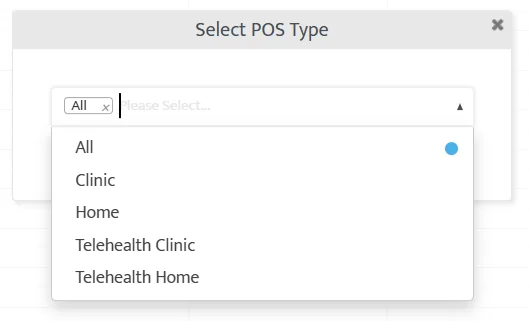
2. POS Tagging in Patient Availability - KBA
Navigation: Patient → Availability
What Changed
Patient availability now captures where a patient is available, not just when.
Users can now tag availability slots for specific Place of Service (POS) types.
What’s New
- Multi-select POS tagging
- POS labels visible directly on availability slots
- POS tags visible in Scheduler hover tooltips
- Recurring availability supports POS tagging
Why This Matters
This helps schedulers know not only when a patient is available, but also where they are available.
3. Group Appointment Transfers Across Authorizations - KBA
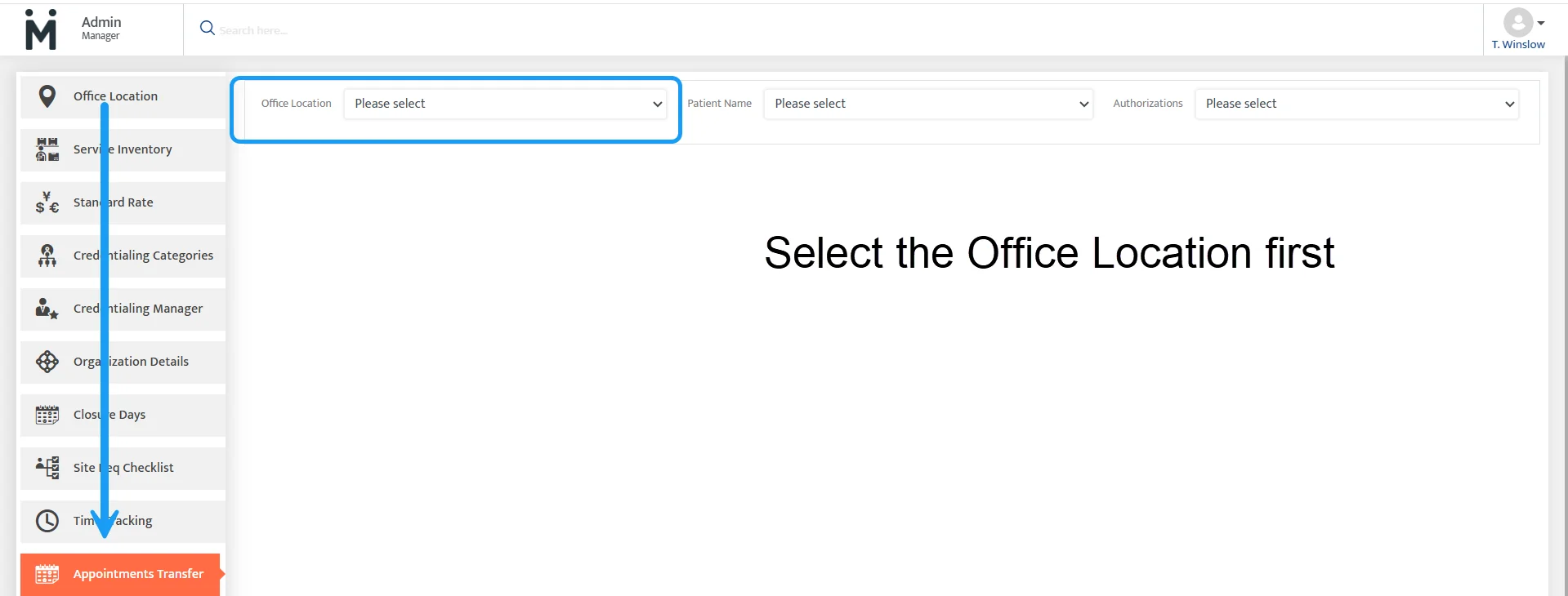
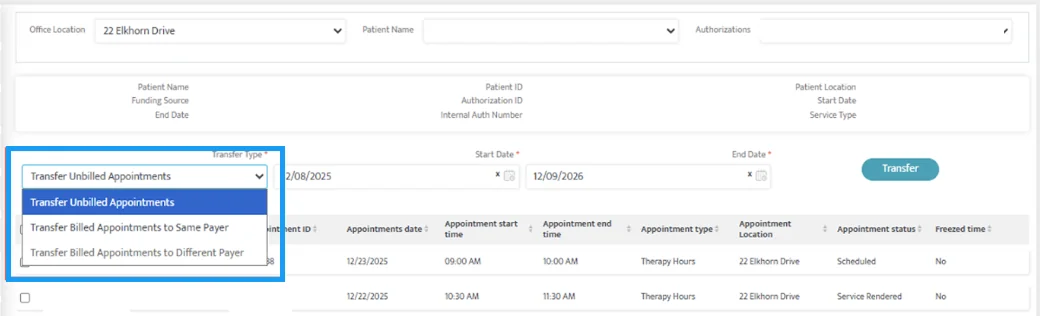
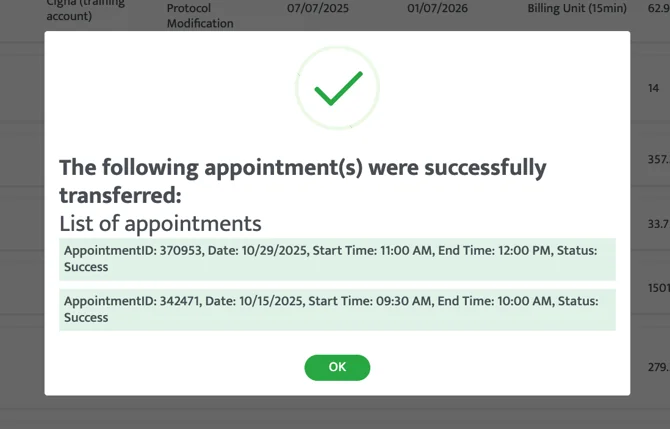
Navigation: Admin → Bulk Appointment Transfer
What Changed
Group appointments can now be transferred between authorizations.
What’s New
- Transfer group appointments between authorizations
- Convert group appointments to standard therapy
- Select specific patients inside group appointments
Why This Matters
This reduces manual cleanup when authorizations change and makes it easier to manage group appointments correctly.
4. Search by Provider in Appointment Conflict Alerts

Navigation: Scheduler → Scheduling Alerts → Appointment Conflicts
What Changed
Provider Name is now searchable inside Appointment Conflict alerts.
Why This Matters
This makes it easier to quickly find provider conflicts in large scheduling alert lists.
5. Session Note Requirement Controls for Appointment Rendering

Navigation: Admin → Access Levels | Service Inventory → Edit Service
What Changed
Organizations can now control when session notes are required during appointment rendering in PM.
Session note requirements can now be configured:
- By access level
- By service
- Separately for billable and non-billable appointments
A session note is only required when both the access-level and service-level settings are enabled.
Why This Matters
This gives organizations more flexibility over documentation requirements and helps reduce unnecessary prompts while maintaining compliance.
Important:
This update only applies to PM rendering workflows and does not impact Clinical documentation.
Revenue Cycle Management (RCM)
Faster billing workflows. Better claim accuracy. Cleaner reconciliation.
Feature Overview
This month’s RCM updates are focused on making billing work faster, easier, and more accurate.
1. Edit Claims Before Posting or Resubmission, KBA

Navigation: Billing → Unposted Batches | Posted Invoices | Collections
What Changed
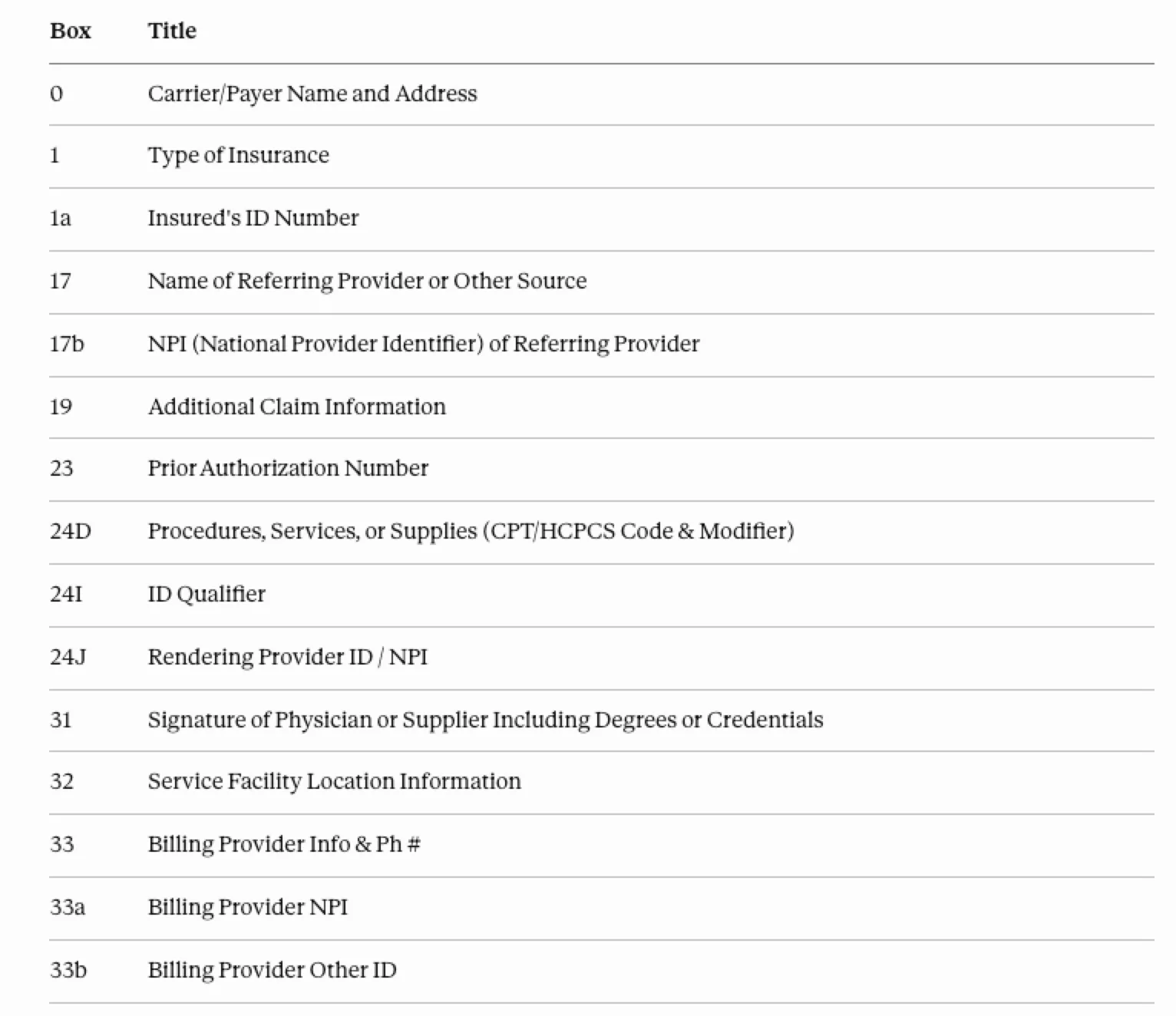
Users can now edit CMS-1500 claim fields before posting or during resubmission without rebuilding the entire claim.
Previously, even small corrections required regenerating the full claim.
What’s New
- New edit (pencil) option on claims
- Editable CMS-1500 claim fields
- Manual edit indicator on edited claims
- Changes automatically update CMS-1500, EDI 837, and reports
- New “Generate, Edit & Post” option during resubmission
Why This Matters
This makes it much easier to quickly fix billing mistakes, reduce rework, and speed up claim processing.
2. Save, Post & Resubmit for Denied Claims

Navigation: Collections → Payment Posting | Denials
What Changed
Users can now post a payment and resubmit denied claims in one step.
Previously, teams had to complete these tasks separately.
What’s New
- New “Save, Post & Resubmit” button
- Automatically finds denied claim lines
- Runs claim scrubbing checks before resubmission
- Supports both internal posting and clearinghouse submission
Why This Matters
This reduces manual denial work, speeds up resubmissions, and helps organizations recover revenue faster.
3. Rendering Provider NPI Override
Navigation: Admin → Role & Clearances | Contracts → Claim Configuration
What Changed
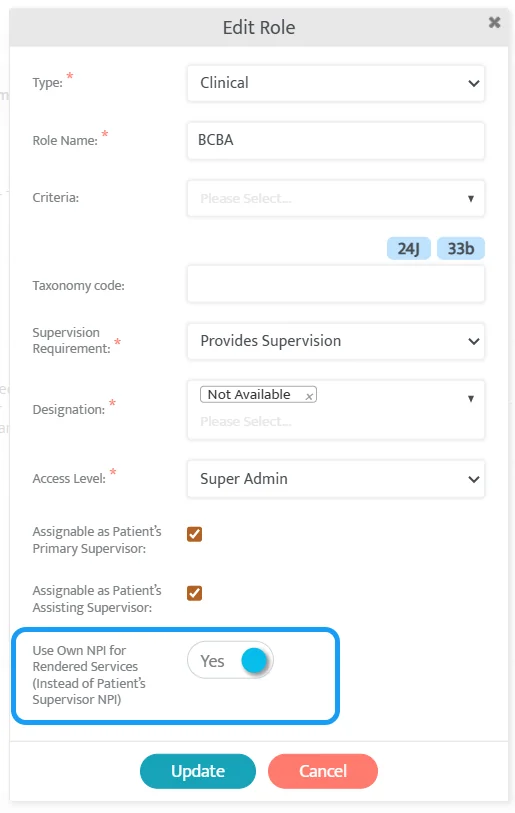
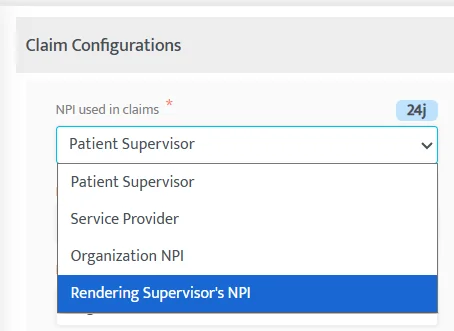
Organizations can now choose to bill using the actual rendering provider’s NPI instead of always using the patient’s supervising provider.
What’s New
- New “Use Own NPI” role setting
- New contract setting for Rendering Supervisor NPI
- Applies across billing, claim generation, regeneration, and resubmission
Why This Matters
This helps make sure the correct provider appears on claims and reduces billing errors or payer rejections.
4. 1 Minute Billing Units
Navigation: Contracts | Authorizations | Scheduler | Billing
What Changed
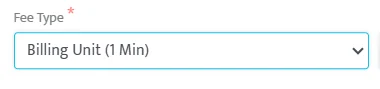
Organizations can now bill using exact minute-based units.
Instead of rounding time into larger units, the system now supports billing where 1 unit = 1 minute.
What’s New
- New billing unit option: 1 Unit = 1 Minute
- No rounding required
- Minute-based authorization tracking
- Works across billing, claims, and reports
Why This Matters
This supports services like drive time or travel where exact minute billing is required.
5. Secondary Overpayment Posting
Navigation: Collections → Payment Posting | Denials
What Changed
Secondary payments can now be posted even when the payment amount is higher than the remaining balance.
Previously, the system blocked these payments.
What’s New
- Supports actual ERA/835 payment amounts
- Better alignment with payer reconciliation logic
- Removes previous posting restrictions
Why This Matters
This improves payment accuracy and reduces manual workarounds during reconciliation.
6. Same Payer Primary & Secondary Policies
Navigation: Patient → Funding Source | Billing & Collections
What Changed
Organizations can now use the same payer for both primary and secondary coverage.
What’s New
- Same payer supported for both coverage levels
- All available policies appear during coverage selection
- Improved visibility across billing workflows
Why This Matters
This supports real-world payer setups where patients may have multiple policies under the same insurance company.
7. DOS Claim Ordering
Navigation: Billing | Collections | Reports
What Changed
Claim lines are now automatically ordered by Date of Service (DOS).
What’s New
- Chronological DOS ordering across billing workflows
- Consistent ordering in CMS-1500 and EDI 837 files
- Matching line order across billing and collections screens
Why This Matters
This makes claims easier to review, improves reconciliation, and reduces confusion caused by mismatched line ordering.
Clinical Module
More flexible documentation. Better internal collaboration. Stronger MPM + MCL data alignment.
Teams can now:
- Keep internal-only documentation out of signed PDFs
- Better support clinician-to-clinician collaboration
Hidden Notes Sections (Internal-Only Sections) - Video
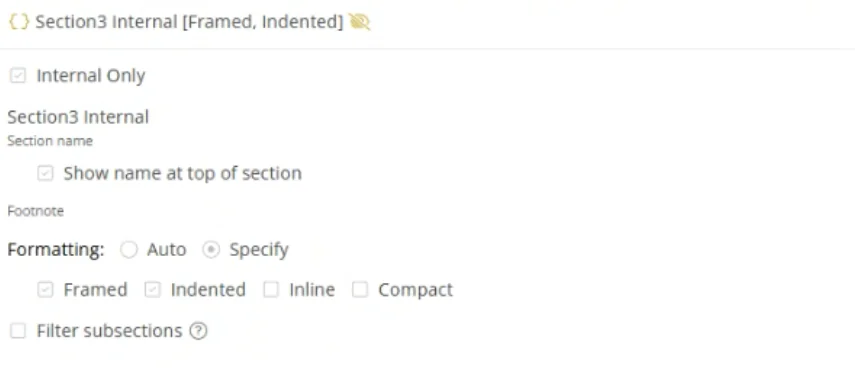
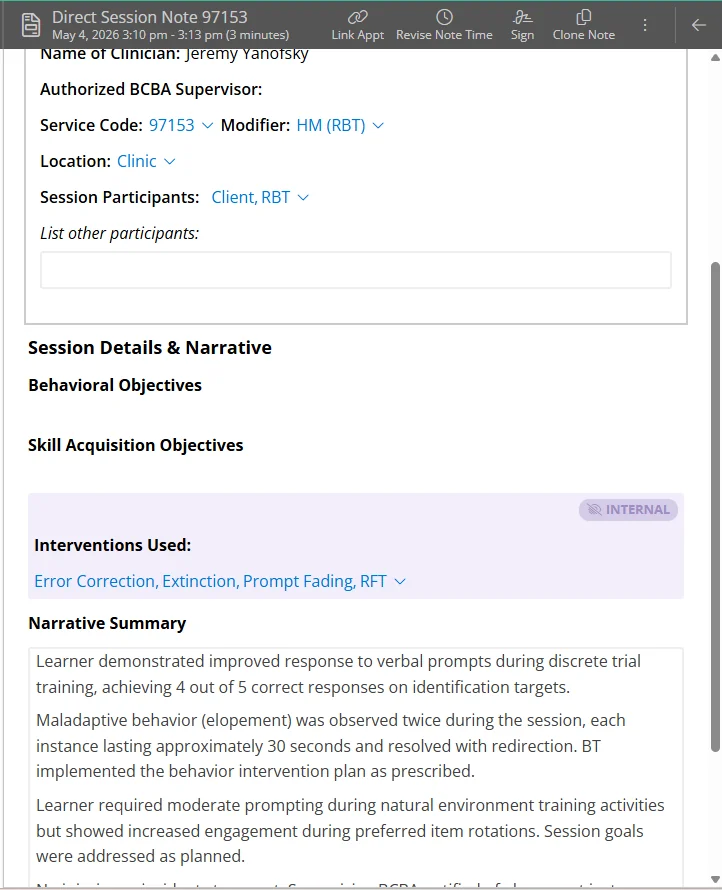
Navigation: Motivity Clinical → Learner Profiles → Note Templates
What Changed
Organizations can now create hidden note sections inside session notes that remain visible within Motivity Clinical but are excluded from the final signed PDF.
What’s New
- Internal-only note sections inside session notes
- Hidden sections excluded from signed PDFs
- Optional restriction of hidden content from parent review access
- Support for clinician-to-clinician internal documentation
Why This Matters
This gives organizations more flexibility in how documentation is managed internally versus externally.
Teams can now:
- Keep internal operational notes separate from signed documentation
- Protect sensitive internal context from external visibility
- Improve clinician collaboration
Reporting Module
More visibility. Better operational insight. Stronger data access controls.
Patient Block Time Report
- Added a report that shows every blocked availability slot for patients.
- Helps organizations analyze patient scheduling limitations and improve operational planning.
Provider Block Time Report
- Added a report for provider blocked time, including leave, breaks, training, and other unavailable time.
- Helps teams better understand provider capacity and workforce availability.
Authorization Max Hours Utilization Report
- Added a consolidated authorization utilization report with utilized hours, remaining hours, weekly targets, and weeks remaining.
- Helps organizations proactively manage authorization usage and prevent under- or over-utilization.
Location-Based Report Data Access Controls
- Added location-based restrictions so users can only view report data for assigned office locations.
- Improves data security, privacy, and compliance with organizational access controls.
Appointment Audit Report Enhancements
- Added session note visibility directly inside the Appointment Audit Report.
- Makes it easier to audit documentation compliance without opening appointments individually.
Outstanding Patient Responsibility Report Enhancements
- Added Parent Primary Email and Parent Telephone Number columns.
- Improves communication workflows and reduces the need to navigate between records.
Patient Availability Report
- Added a report showing all patient availability slots and patients with no availability.
- Helps organizations identify scheduling gaps and improve capacity planning.
Provider Availability Report
- Added a report showing all provider availability slots and providers with no availability.
- Helps teams analyze provider coverage and staffing availability more effectively.
Additional Updates
- Scheduler compliance alerts now clear correctly when requirements are resolved or removed.
- Expiring provider credentials now appear in the correct alert category, even if they are still unverified.
- Credentials expiring within 60 days are now prioritized in Expiring Soon alerts.
- Compliance alerts and dashboard tiles now stay aligned and up to date.
- Helps teams identify urgent credential issues faster and reduces confusion caused by outdated or incorrect alerts.
- Expanded caregiver and parent profile fields from Motivity PM now automatically sync into Motivity Clinical learner profiles and note template imports, helping reduce duplicate data entry and improve consistency between MPM and MCL data.