
Here's what you can expect:
- Smarter scheduling tools
- A clearer view of your revenue cycle
- Helpful billing alerts
- Simplified billing workflows
Result: More confidence, better visibility, and smoother day-to-day operations
Scheduling/Operations Feature Overview
Scheduling is now faster and more flexible, with smarter recurring appointments, easier rescheduling, and automatic checks that make sure appointments meet requirements (like authorizations, provider availability, and conflicts) before they're scheduled or moved.
1. AI Coach for Patients (Beta) – Proactive Risk & Compliance Guidance
Where to Find it: Patient Module → Overview
At a Glance
A smart assistance that reviews each patient's setup and activity to find potential issues (like missing info, compliance risks, or billing gaps) and tells you exactly what needs to be fixed and why.
What's New
- AI-powered risk detection: Automatically identifies issues in patient setup and history
- Clear issue categories: Flags operational, compliance, and revenue risks
- Priority levels: Highlights issues as high, medium, or low priority
- Actionable insights: Explains what the issue is, why it matters, and what to do next
Why This Matters
- Catch and fix issues before they cause delays or denials
- Improve patient readiness for scheduling and billing
- Save time by having all checks in one place
Important note:
- AI Patient Coach provides recommendations only—it does not make changes for you
- You stay in full control of all actions and updates
- This is a Beta release, with more enhancements coming soon
2. Link Multiple Make-Up Appointments to One Cancelled Session
Where to Find it: Scheduler → Appointment Details → Link Appointment → Select Cancelled Appointment
At a Glance
You can now link multiple make-up or fill-in appointments to a single cancelled appointment, making it easier to track how missed sessions are made up.
What's New
- If a session is cancelled, you can link that original appointment to multiple make-up or fill-in appointments
- You can track how the cancelled session time is made up across multiple appointments
- You can view all linked appointments together to understand how the missed session was covered
Why This Matters
- Better reflects real-world scheduling (splitting sessions into multiple make-ups)
- Easily track how missed time is recovered
- Improves visibility into appointment coverage
Scheduling/Operations Enhancements
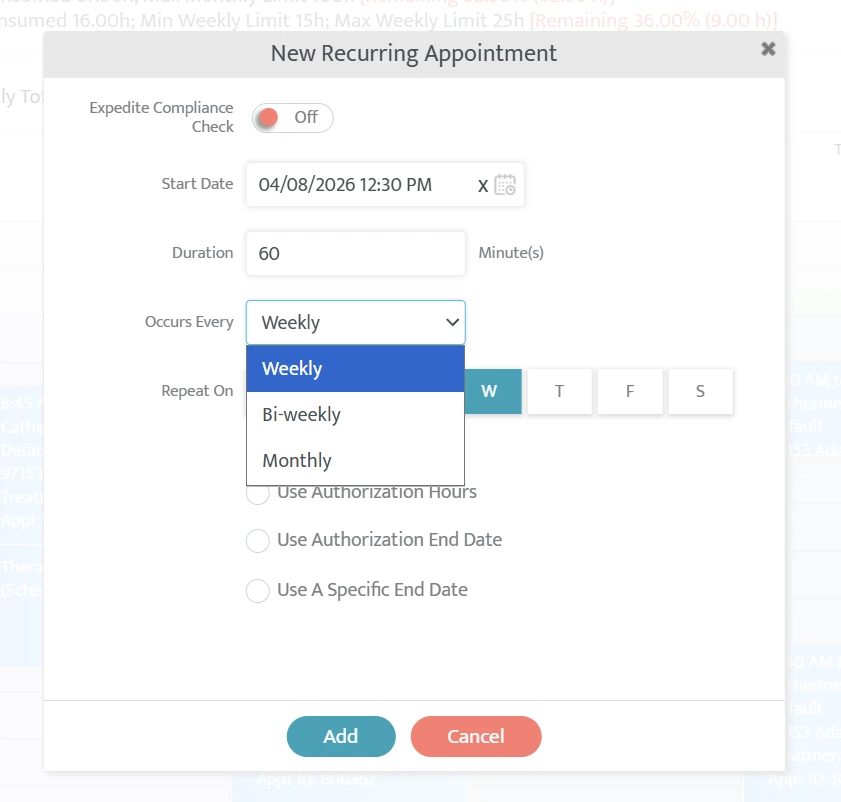
- Flexible recurring schedule options: Users can now schedule recurring appointments biweekly or monthly. Read Knowledge Base Article →
- Easier rescheduling with drag-and-drop: Users can move appointments across times, days, and providers directly from the schedule. Watch walkthrough video →
- Better control over recurring appointments: Users can choose to update a single appointment or all future appointments in a series.
- Improved group appointment handling: Users can move or update a group appointment and apply the changes to all patients' schedules in that group at once. Read Knowledge Base Article →
- Bulk appointment updates: Users can cancel multiple appointments at once instead of updating them one by one. Requires Mass Appointment Update permission.
- Automatic drive time removal on cancellation: When an appointment is cancelled, associated drive time is automatically removed to keep schedules accurate.
- Ensure POS Selection Matches Authorization Requirements: The system only allows POS options that match the authorization and requires you to reselect a valid POS if the authorization changes.
- Recurring series management in All Providers view: Users can now edit or delete recurring appointment series directly from the All Providers view.
- Edit and find documents more easily: Users can now update document type and tags after upload and quickly search or filter to find documents. Requires Edit Document permission.
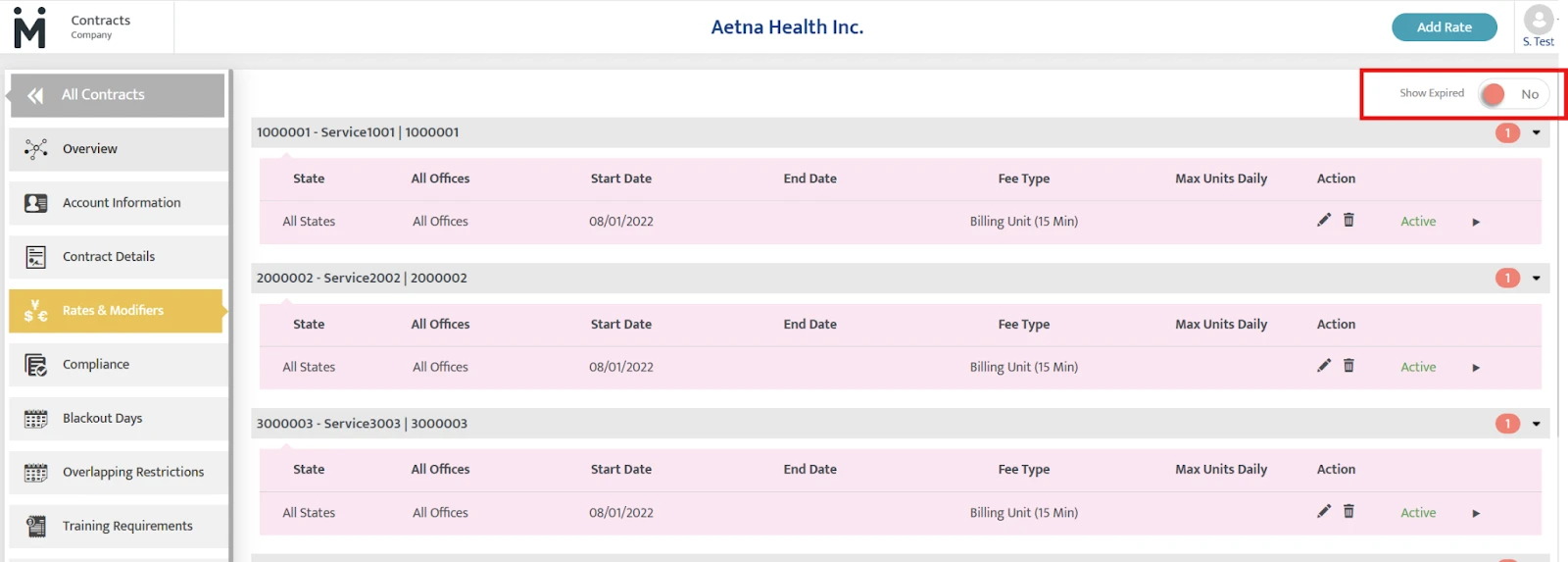
- Hide or show expired rates within the Contract setup as needed: Expired rates are now clearly labeled and can be hidden or shown with a toggle for a cleaner view.
- Filter reports by specific questions: In Contract Requirement Reports, users can now filter results by individual questions within a requirement to focus on exactly what they need.
- Upload compliance files with drag-and-drop: Users can quickly upload or replace files by dragging and dropping instead of browsing.
RCM Feature Overview
This release brings meaningful improvements to denial management, billing visibility, payment processing, and patient collections—all designed to reduce delays, give you clearer insight into your finances.
1. Appointment Details Added to Invoice Timeline
Where to Find it: Billing & Collection → Invoice Timeline
At a Glance
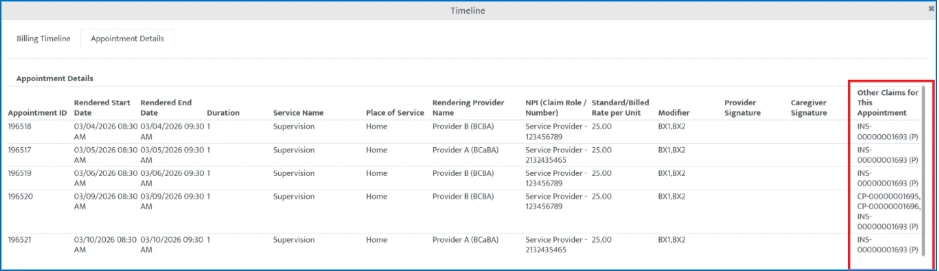
A new "Appointment Details" tab in the Invoice Timeline (Green hamburger menu) shows all appointment info and related claims in one place.
What's New
- New tab in the Invoice Timeline for appointment details
- See all claims tied to an appointment (primary, secondary, voided)
- "Other Claims" column shows related claims in one list
Why This Matters
- Easily see the full picture for each appointment
- Spend less time searching for related claims
- Make billing reviews faster and simpler
2. Upload One EDI File, Post One Payment (Even with Multiple Payers)
Where to Find it: Contracts → Contract Details → Plan Type / Collection → Add Payment
At a Glance
If you receive one EDI file that includes payments from multiple payers, you can now post it as a single payment—Motivity will automatically split and apply the amounts to the correct payers for you.
When you'd use this:
- You receive a single EDI file with payments from multiple disciplinary services from related payers
- You work with payers that have multiple plans under one organization (e.g., commercial, Medicaid, Medicare)
- You want to avoid manually splitting payments by payer
What's New
- Post one payment even if the file includes multiple payers
- Automatic splitting of payments to the right payers behind the scenes
- New "Affiliated Payer Name" in the Contract Module to group related payers together
Why This Matters
- No more manually splitting payments by payer for multidisciplinary services
- Saves time and reduces errors
- Simplifies complex billing situations
3. Email Patient Statements to Any Patient (with Secure Access & Tracking)
Where to Find it: Billing → Posted Invoices → Print/Email → Email Patient Responsibility Statement
At a Glance
You can now email patient statements to anyone, securely and easily, even if you don't use an online payment portal.
What's New
- Email statements for all accounts (no Stripe required)
- Secure, password-protected PDFs for every statement
- Automatic email format based on your setup:
- With Stripe: includes a payment link so patients can pay online
- Without Stripe: sends a secure statement without a payment link
Why This Matters
- Reach all patients, regardless of your payment setup
- Keep patient financial information secure and compliant
- Make it easier to follow up on outstanding balances
RCM Enhancements
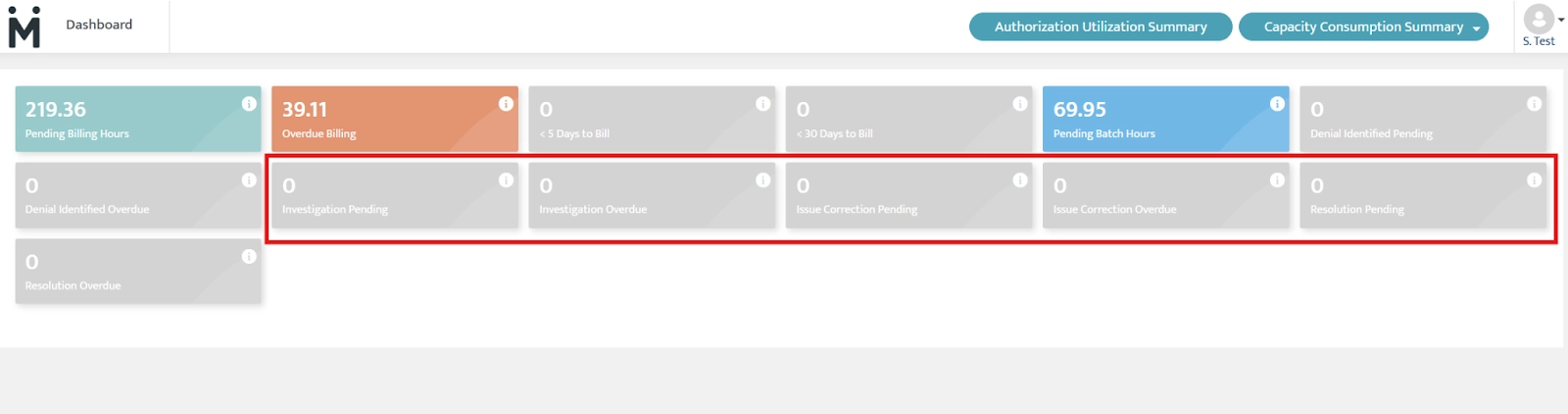
- Track denials with dashboard alerts: Users can now see alerts for each stage of the denial workflow in the dashboard, making it easier to follow up quickly and avoid delays in payment.
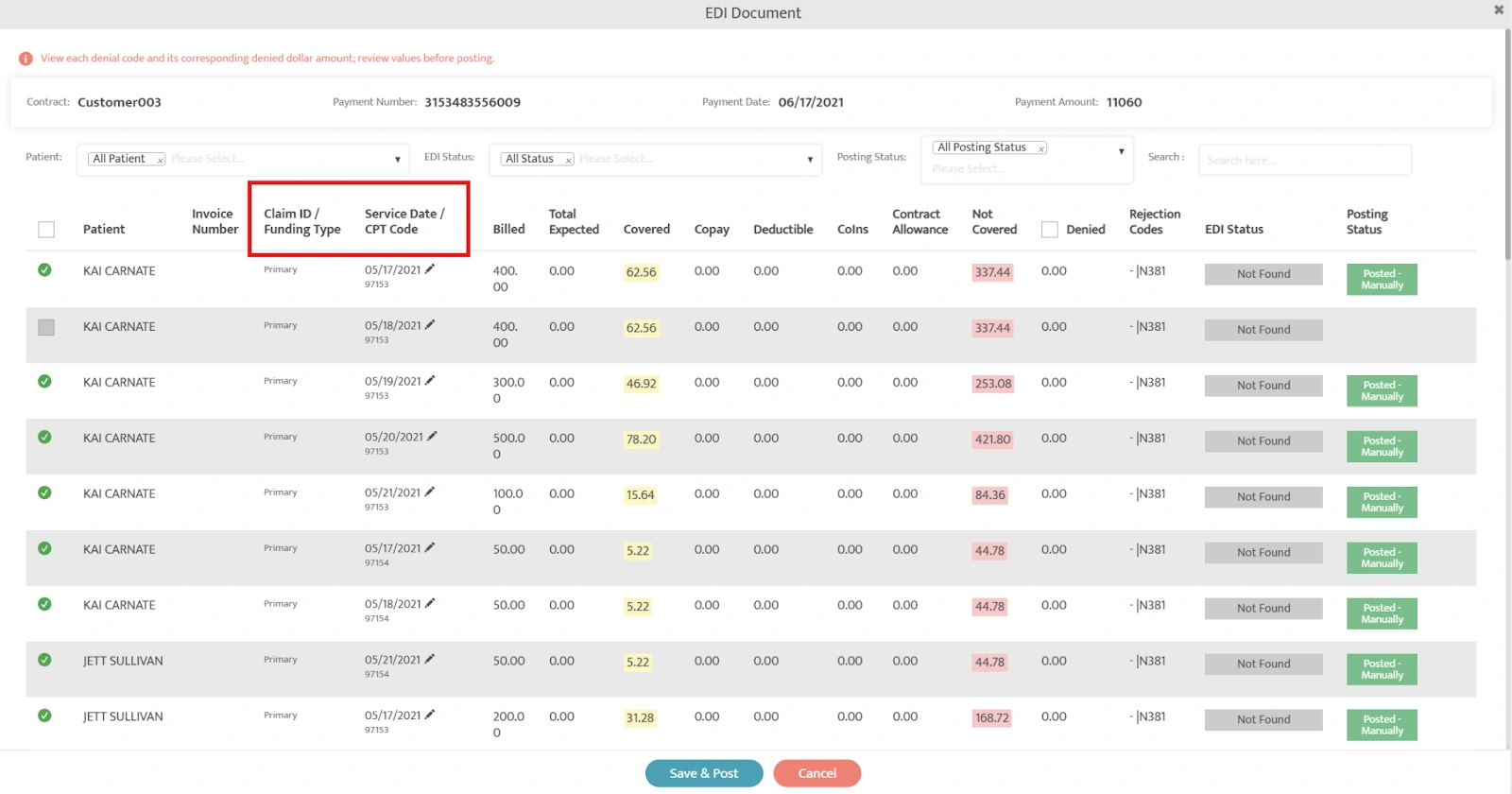
- Improved EDI popup visibility: Users can now view all key claim details in a single, scroll-free layout for faster and easier review.
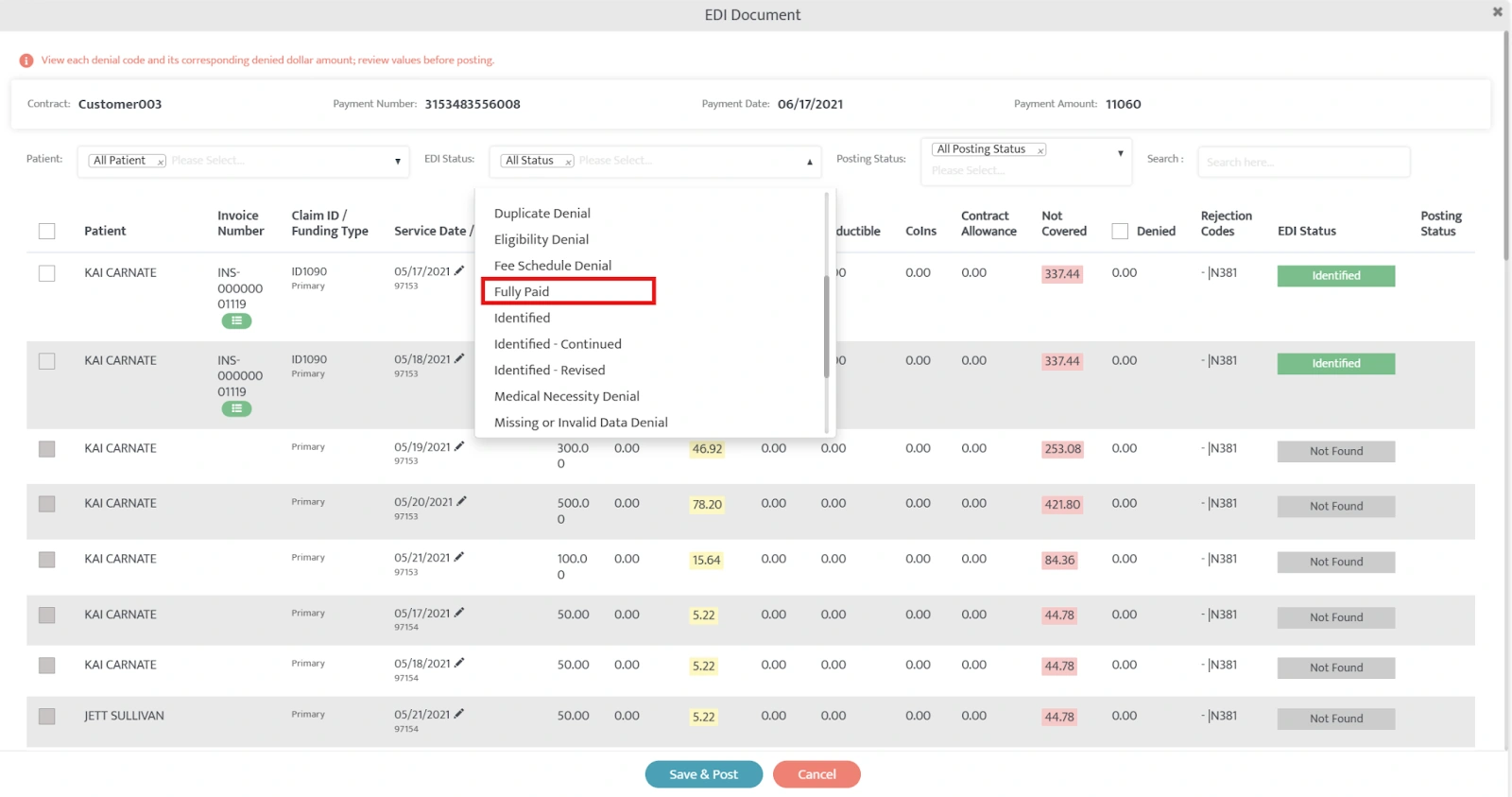
- Fully paid claim visibility during payment posting: Users can now quickly filter and identify fully paid claims in the EDI popup while processing payments, making review and posting faster and easier.
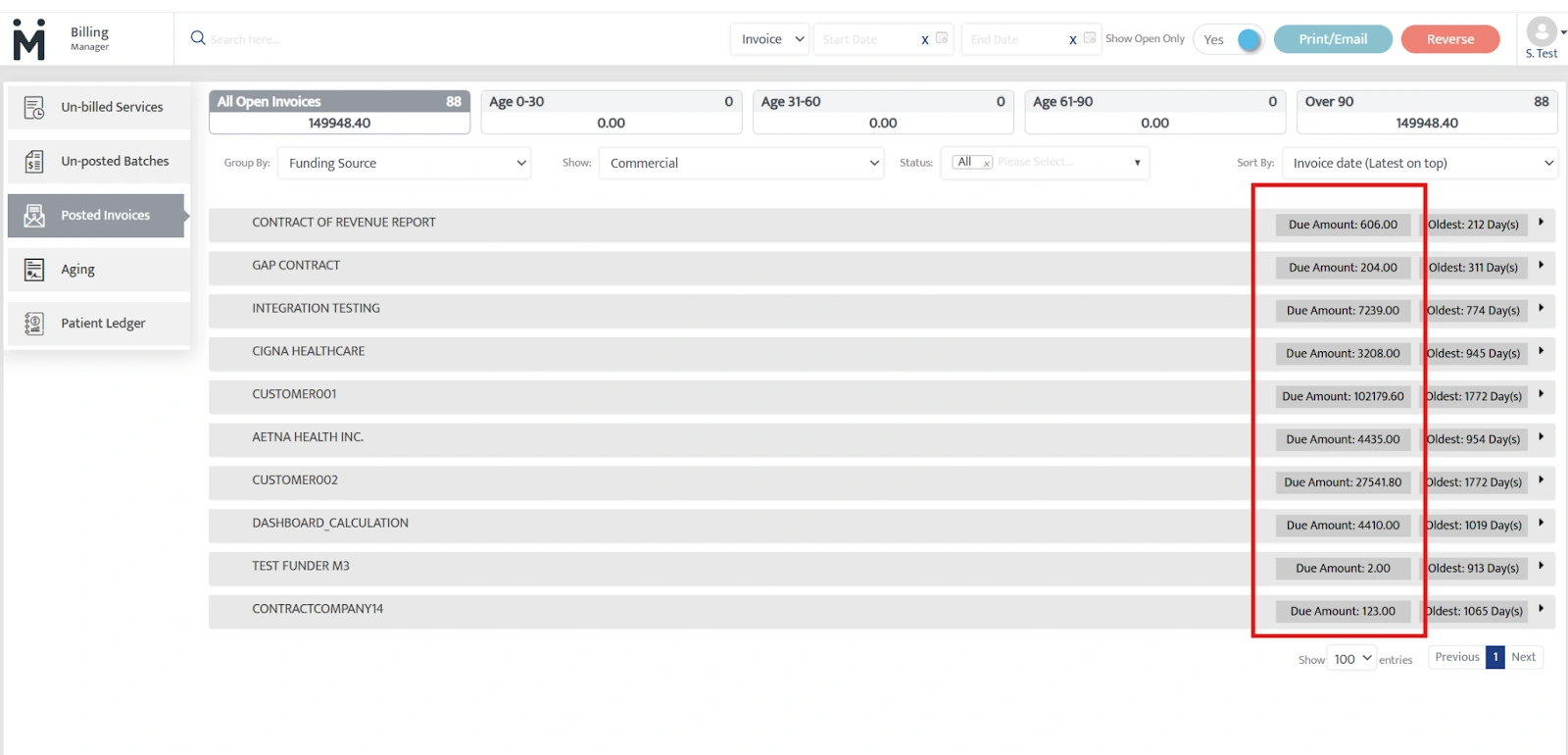
- See what each payer still owes: Users can now see the total outstanding balance for each funding source in Posted Invoices, making it easier to understand balances and prioritize collections.
- Denial insights added to AR reports: AR reports now include denial categories and codes directly in the report, so users can see why claims were denied without switching screens.
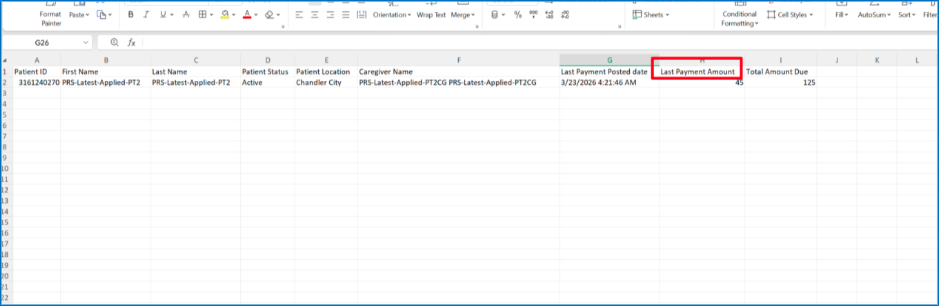
- Clearer patient payment and balance reporting: The Outstanding Patient Responsibility Report now shows more accurate payment details, clearer labels, and full adjustment amounts for a better view of what patients owe.
Clinical Enhancements
This month's clinical enhancements improve efficiency, clarity, and reporting. Users can quickly clone roles, export data at scale, and create more targeted reports with domain filtering. Updates to note creation and new learner profile fields (MRN and supervisors) also make documentation faster, clearer, and more accurate.
- Clone roles for faster setup: Users can now duplicate existing roles and their permissions, making it easier to create consistent role variations while reducing manual work and errors.
- Bulk data exports for faster insights: Users can now export clinical data across one learner, groups, or all learners in a single CSV—improving efficiency, enabling easier audits, and providing greater visibility into note status and documentation completeness. Read Knowledge Base Article →
- Domain filtering for more focused reporting: Users can now include or exclude specific domains directly within report templates, reducing manual cleanup and ensuring reports are tailored, consistent, and clinically relevant. Read Knowledge Base Article →
- Refined note creation workflow: Users can now more easily distinguish between standalone and appointment-linked notes with clearer labels and a simplified UI, while maintaining a fast, efficient workflow.
- Expanded learner profile fields in notes: Users can now include Medical Record Numbers (MRN) and detailed supervisor information as imported fields in clinical notes and reports, improving accuracy, reducing manual entry, and ensuring the right data is always reflected.